Pravision® Officially Registered

A New Milestone in Our Journey

We’re happy to share some exciting news! Pravision® is now an officially registered trademark with the United States Patent and Trademark Office (USPTO)!

This is a special moment for us and an important milestone in our journey.

What started with an idea and a name has grown into something we continue to build and believe in every day. Seeing Pravision officially registered as a trademark makes this achievement even more meaningful.

Pravision Is More Than Just a Name

Pravision is not just a name. It represents our work, our ideas, the challenges we’ve faced, the lessons we’ve learned, and everything we hope to accomplish.

It reflects our belief in looking beyond what exists today and imagining what could be possible tomorrow.

For us, Pravision means bringing vision to life, seeing tomorrow’s possibilities today, and finding ways to make them real.

Every project we take on and every solution we create is part of that journey. Some ideas come to life quickly, while others take time, patience, and determination. Each one teaches us something and helps us move forward.

Having our trademark officially registered is an important step in protecting the identity we’ve worked to build.

Helping Businesses with What Matters Every Day

At Pravision, we believe every business deserves access to technology and support that makes running a business easier, regardless of its size.

Whether it’s a one-person business, a small local shop, a growing company, or a mid-sized organization, each has its own challenges, responsibilities, and goals.

We understand that business owners often manage many things at once. From daily operations and customer relationships to scheduling, managing information, maintaining an online presence, and finding new opportunities, even the smallest tasks can take valuable time.

Our goal is to help businesses simplify their everyday work, manage their operations more efficiently, and focus on what matters most to them.

We want technology to be practical, accessible, and useful, not something that adds more complexity to an already busy day.

For us, helping a small business save time or making daily work easier for a growing team is just as meaningful as building a larger solution.

Every business matters, no matter how small it starts.

Looking Back and Moving Forward

Building a company comes with its share of challenges, decisions, and unexpected turns. There are moments when things go as planned and others when we have to find a different way forward.

Through it all, we keep learning, improving, and building.

This trademark registration is one of those achievements that makes us stop for a moment, look back at how far we’ve come, and feel proud of the progress we’ve made.

While our name now carries the ® symbol, what matters most to us hasn’t changed. We remain committed to creating useful solutions, doing meaningful work, and earning the trust of the people and businesses we serve.

There is still much more ahead of us, and we’re excited to keep going.

Thank You for Being Part of Our Journey

We want to thank everyone who has supported Pravision, worked with us, trusted our services, or encouraged us along the way.

Every conversation, opportunity, and word of encouragement has meant something to us.

We’re grateful for the support we’ve received and proud to share this milestone with everyone who has been part of our journey.

Official Trademark Registration

The PRAVISION wordmark is officially registered with the United States Patent and Trademark Office (USPTO).

The registration covers Software as a Service (SaaS) services under International Class 042.

This recognition is an important step in protecting the Pravision brand as we continue developing technology solutions and supporting businesses with their everyday needs.

Trademark Details

  • Registered Wordmark: PRAVISION

  • Registration Status: LIVE, REGISTERED

  • USPTO Serial Number: 99629639

  • International Class: 042

  • Goods and Services: Software as a Service (SaaS)

  • Trademark Authority: United States Patent and Trademark Office (USPTO)

View Pravision’s Official USPTO Trademark Record

The Journey Continues

This registration is an achievement worth celebrating, but it is also a reminder that we’re still building, still learning, and still working toward what comes next.

We started with a name and an idea. Today, that name is officially registered, and the story behind it continues to grow.

Our commitment remains simple: to help businesses, from the smallest independent operations to growing organizations, make better use of technology and spend more time on what matters to them.

Pravision® | Where vision meets its perfect fit.

Here’s to how far we’ve come and everything still to come.

Is Your Website Really Secure? What the October 2026 Node.js Security Updates Mean for Businesses

Why software updates, WordPress maintenance, and application security deserve attention even when everything appears to be working.

A business website is often considered healthy as long as it loads properly, customers can complete transactions, and contact forms or appointment systems continue working. However, the reliability of a website is not always an indication of its security. Behind the pages customers see are software components, databases, plugins, and connected applications that require regular updates and maintenance. While some issues are immediately noticeable, others can remain hidden for months, leaving businesses exposed to security vulnerabilities without any obvious warning signs.

The recent Node.js security updates released on October 21, 2026, highlight the importance of maintaining the technology behind business websites and applications. The Node.js project addressed multiple vulnerabilities affecting supported versions of the software. These issues involve essential functions such as DNS resolution, secure connections, data processing, and filesystem permissions. Although the technical details may not be familiar to most business owners, the potential consequences are relevant to organizations that rely on digital systems for customer interactions, transactions, and daily operations.

The announcement also raises an important consideration for businesses using platforms such as WordPress: understanding which technologies are actually running their websites, how different software components interact, and why maintaining one system does not necessarily mean every connected application is protected.

Understanding the October 2026 Node.js Security Updates

Node.js is a widely used JavaScript runtime that allows developers to build server-side applications, APIs, customer portals, inventory systems, booking platforms, and other digital services. Many businesses depend on applications built with Node.js without necessarily knowing that the technology is part of their infrastructure. These applications often operate behind the scenes, connecting websites to databases, processing information, or communicating with third-party platforms.

On October 21, 2026, the Node.js project published [a security release announcement] addressing vulnerabilities in its supported release lines. The reported issues include weaknesses related to certificate validation, DNS handling, HTTP connections, compressed data processing, and filesystem permissions. Depending on the specific vulnerability and how an application uses the affected functionality, consequences can include security weaknesses, application crashes, or other unexpected behavior.

The project released Node.js versions 22.23.4, 24.22.1, and 26.12.1 to address the identified security issues. These updates are important for organizations operating applications on affected versions, but the level of risk depends on how each application is developed, configured, and deployed. A vulnerability affecting a particular Node.js function does not automatically mean every application using Node.js can be exploited. Nevertheless, known vulnerabilities should be reviewed and addressed promptly because they can become more significant when combined with other weaknesses in an application’s environment.

The complete technical details and security fixes are available in the [official Node.js October 2026 security announcement].

October 2026 Node.js Security Updates

Node.js Release Line

Security Update

Recommended Action

Node.js 22.x

22.23.4

Apply the security patch and plan migration before end of support.

Node.js 24.x

24.22.1

Update to the patched release and test application compatibility.

Node.js 26.x

26.12.1

Apply the security update and verify application functionality.

Unsupported Node.js Versions

No supported security release

Plan migration to a supported Node.js version.

Source: [Official Node.js October 21, 2026 Security Releases]

How Node.js Relates to WordPress Websites and Plugins

WordPress powers many business websites, including online stores, professional service websites, and organizations that depend on online inquiries or appointments. Unlike applications built directly with Node.js, WordPress primarily operates using PHP and a database such as MySQL or MariaDB. A standard WordPress website does not require Node.js to serve its pages or manage its core functionality. However, Node.js can still be involved in the development of WordPress plugins, the creation of interactive features, and the operation of separate applications connected to a WordPress website.

Does Your WordPress Plugin Require Node.js?

Plugin Type

Node.js Required on Live Website?

WooCommerce

No, not for standard operations.

WPForms

No, not for standard operations.

Yoast SEO / Rank Math

No, not for standard operations.

Elementor

No, not normally.

WordPress Gutenberg Editor

No, not for normal editing and publishing.

Custom API Integration Plugins

Sometimes, depending on the connected application.

Real-Time Chat or Notification Plugins

Sometimes, depending on the service provider.

Custom React-Based Plugins

Not necessarily; depends on the application architecture.

Popular plugins such as WooCommerce, WPForms, Elementor, Yoast SEO, and Rank Math generally do not require a Node.js server to operate on a live WordPress website. Some of these products use Node.js during development to compile JavaScript, manage dependencies, or build interactive components. The WordPress Gutenberg block editor is another example of technology that relies on JavaScript development tools, including Node.js, while the completed components typically run within the WordPress and browser environments. This distinction is important because software used to develop a plugin is not necessarily the same software required to operate that plugin after installation.

The situation changes when a WordPress website communicates with a separate application that runs on Node.js. For example, an online store may use WooCommerce to manage products, orders, and payments while connecting to a custom inventory management system. When a customer purchases an item, the inventory application may automatically update stock levels across multiple sales channels. If that inventory system runs on Node.js, it requires its own security updates, dependency management, and compatibility testing, regardless of whether the WordPress website is fully updated.

A similar situation can occur with appointment scheduling. A chiropractic office, consulting business, or other service provider may operate a WordPress website while using a separate application to manage appointments, send confirmations, and synchronize customer information with a CRM. The booking application may function reliably for months, but if its underlying Node.js environment is outdated, it could remain exposed to vulnerabilities affecting the functions it uses. Updating WordPress plugins would not automatically resolve security issues within that separate application.

These examples demonstrate why businesses need to consider their entire technology environment rather than focusing exclusively on the website’s content management system. A website may depend on several interconnected services, each with different software requirements, update schedules, and security responsibilities. Maintaining WordPress is essential, but it is only one part of protecting a business that relies on additional applications and integrations.

Security Patches Versus Major Software Upgrades

When a security announcement is released, businesses and developers often face a decision about whether to install an update within their existing software version or move to a newer major release. Although both approaches can improve security, they serve different purposes and involve different levels of risk. A security patch is generally intended to address identified vulnerabilities while minimizing changes to existing functionality. A major version upgrade may introduce additional features, architectural improvements, changes to supported APIs, or new compatibility requirements that affect how an application operates.

For organizations currently using Node.js 22, the October 2026 release provides version 22.23.4 to address the security issues covered by the announcement. Moving directly from Node.js 22 to Node.js 26 is a more substantial change that should be evaluated carefully, particularly for production applications that support customer transactions or essential business operations. Application dependencies, database connections, authentication processes, payment integrations, and external APIs may require testing before a major upgrade is introduced.

Software support timelines are equally important. Installing the latest security patch for an existing release helps address immediate vulnerabilities, but it does not extend that release’s official support period. Businesses should review the [Node.js release lifecycle] and plan migrations before their current version reaches end of life. For production systems, a supported Long-Term Support release is generally preferable to adopting a newer release solely because it has the highest version number.

A well-managed update process includes identifying the software currently in use, reviewing relevant security announcements, creating reliable backups, applying appropriate patches, and verifying that critical application functions continue working correctly. Major upgrades should be scheduled with sufficient time for compatibility testing and troubleshooting. This approach helps businesses improve security while reducing the possibility of unexpected interruptions.

Why Ongoing Website and Application Maintenance Matters

One of the most common misunderstandings about website maintenance is the assumption that software only needs attention when something stops working. In reality, many security vulnerabilities do not produce visible errors. A website may continue accepting orders, processing contact forms, and displaying information correctly while running outdated components that require attention. Because these issues are often invisible to customers and business owners, relying on normal website functionality as the primary measure of security can create a false sense of confidence.

Software maintenance also involves more than responding to security vulnerabilities. Hosting providers periodically update their infrastructure, payment processors change integration requirements, plugins introduce new functionality, and software developers discontinue support for older versions. An application that worked reliably when it was first launched may gradually become incompatible with the systems it depends on. Without regular reviews, businesses may discover these problems only after a payment integration fails, an appointment system stops responding, or an important feature becomes unavailable.

For a WordPress website, ongoing maintenance generally includes updating WordPress core, reviewing plugins and themes, maintaining a supported PHP environment, checking backups, monitoring security, and verifying that important features continue functioning after updates. For custom applications, maintenance may also involve updating Node.js or other runtime environments, reviewing software dependencies, testing APIs, and monitoring application performance. SSL certificate management, hosting configuration, and database maintenance are additional responsibilities that may affect the reliability and security of the overall system.

The level of maintenance required depends on the complexity of the website and its role in business operations. A small informational website may have relatively straightforward requirements, while an e-commerce platform connected to inventory software, payment services, shipping providers, and a CRM requires broader technical oversight. Understanding these differences helps businesses allocate resources appropriately and avoid assuming that a single update protects every part of their digital infrastructure.

The Difference Between Website Maintenance and SEO

Website maintenance and search engine optimization are both important to a business’s online presence, but they address different responsibilities. SEO focuses on improving visibility in search engines through content optimization, keyword strategy, technical analysis, and performance monitoring. Website maintenance focuses on keeping the underlying technology updated, functional, secure, and compatible with the services it depends on.

The distinction becomes particularly relevant when an SEO audit identifies technical issues. For example, an audit may reveal slow page loading, broken links, or performance problems that affect search visibility. Identifying these issues may be part of the SEO process, while resolving them could require website development or maintenance work. Similarly, updating PHP, repairing plugin conflicts, renewing SSL certificates, or applying Node.js security patches generally falls outside routine SEO activities unless those services are specifically included in the agreement.

Businesses benefit from understanding what each service covers and how the responsibilities are coordinated. A website can achieve strong search rankings while still running outdated software, just as a well-maintained website may struggle to attract visitors without an effective SEO strategy. Long-term digital performance requires attention to both visibility and technical reliability.

Taking a Proactive Approach to Business Technology

Maintaining a secure and reliable website begins with understanding the systems supporting it. Business owners do not need to become software developers, but they should have a clear understanding of who manages their website, which applications are connected to it, and whether those systems are receiving appropriate updates. This includes knowing whether the hosting environment uses supported software, whether plugins and integrations are reviewed regularly, and whether reliable backups are available before significant changes are made.

Businesses should also understand how updates are handled. Applying every available update immediately without reviewing compatibility can create operational problems, particularly when websites depend on custom functionality or third-party integrations. At the same time, postponing important security patches indefinitely increases exposure to known vulnerabilities. Effective maintenance requires balancing timely security improvements with appropriate testing, planning, and verification.

The October 2026 Node.js security releases illustrate why this process matters. Organizations running affected Node.js versions need to review the announcement and determine the appropriate updates for their environments. Businesses operating WordPress websites should continue maintaining WordPress, PHP, plugins, and hosting infrastructure while also reviewing any separate applications connected to their websites. The objective is not to treat every security announcement as an emergency for every website, but to identify relevant risks and respond appropriately.

How Pravision Supports Website and Application Maintenance

At Pravision LLC, we work with businesses that depend on their websites and digital systems to support customer interactions and daily operations. With the recent Node.js security updates, businesses may be wondering whether their websites or applications use Node.js, which version is installed, and whether they need to take action. Pravision can help identify where Node.js is being used, review the installed versions, and determine whether the latest security vulnerabilities affect their applications. If updates are necessary, we can assist with applying the appropriate security patches or upgrading Node.js to a supported version, while reviewing application compatibility to minimize disruptions to business operations.

Beyond Node.js security updates, our services include WordPress website maintenance, plugin and theme updates, hosting support, SSL certificate management, troubleshooting, website performance monitoring, and business application integrations. We help businesses understand the technology supporting their operations and identify areas that may require updates, technical improvements, or ongoing maintenance. Whether a business operates a standard WordPress website, an e-commerce store, or a custom application, our goal is to help keep its digital systems reliable, secure, and aligned with its operational needs.

Every business has different requirements, and the appropriate solution depends on its existing technology, operational needs, and long-term goals. Some issues can be resolved through routine software updates or configuration changes, while others require more extensive troubleshooting or application upgrades. Our focus is on providing practical technical support that helps businesses maintain reliable websites and make informed decisions about their digital infrastructure.

The recent Node.js security updates reinforce an important principle: a website or application does not have to stop working before it needs maintenance. Security, compatibility, and reliability require ongoing attention, even when everything appears to be functioning normally. Businesses that take a proactive approach to maintaining their technology are better positioned to reduce avoidable disruptions, protect their operations, and support future growth.

If you are unsure whether your website, WordPress plugins, or connected business applications use Node.js, Pravision can help you identify where it is running, determine whether updates are required, and assist with installing the appropriate security updates. A technical review can also help identify outdated software, potential compatibility concerns, and other areas that may need attention.

Pravision LLC provides website maintenance, hosting support, troubleshooting, application security updates, and digital business solutions designed to help businesses keep their technology secure, updated, and working reliably.

Website: pravision.com  

Phone: 925-744-6999

Precision-Driven Digital Solutions for Your Business Success.

—

Sources

Node.js Project. (October 21, 2026). Wednesday, October 21, 2026 Security Releases. [Official Node.js security announcement].


Image Gallery

SEO vs. Website Maintenance: Understanding Who Takes Care of What

When you receive an SEO report, you may see recommendations about keywords, content, headings, website speed, page structure, or even technical problems with the website.

A common question is: If it is in the SEO report, isn’t it part of the SEO service?

Not necessarily.

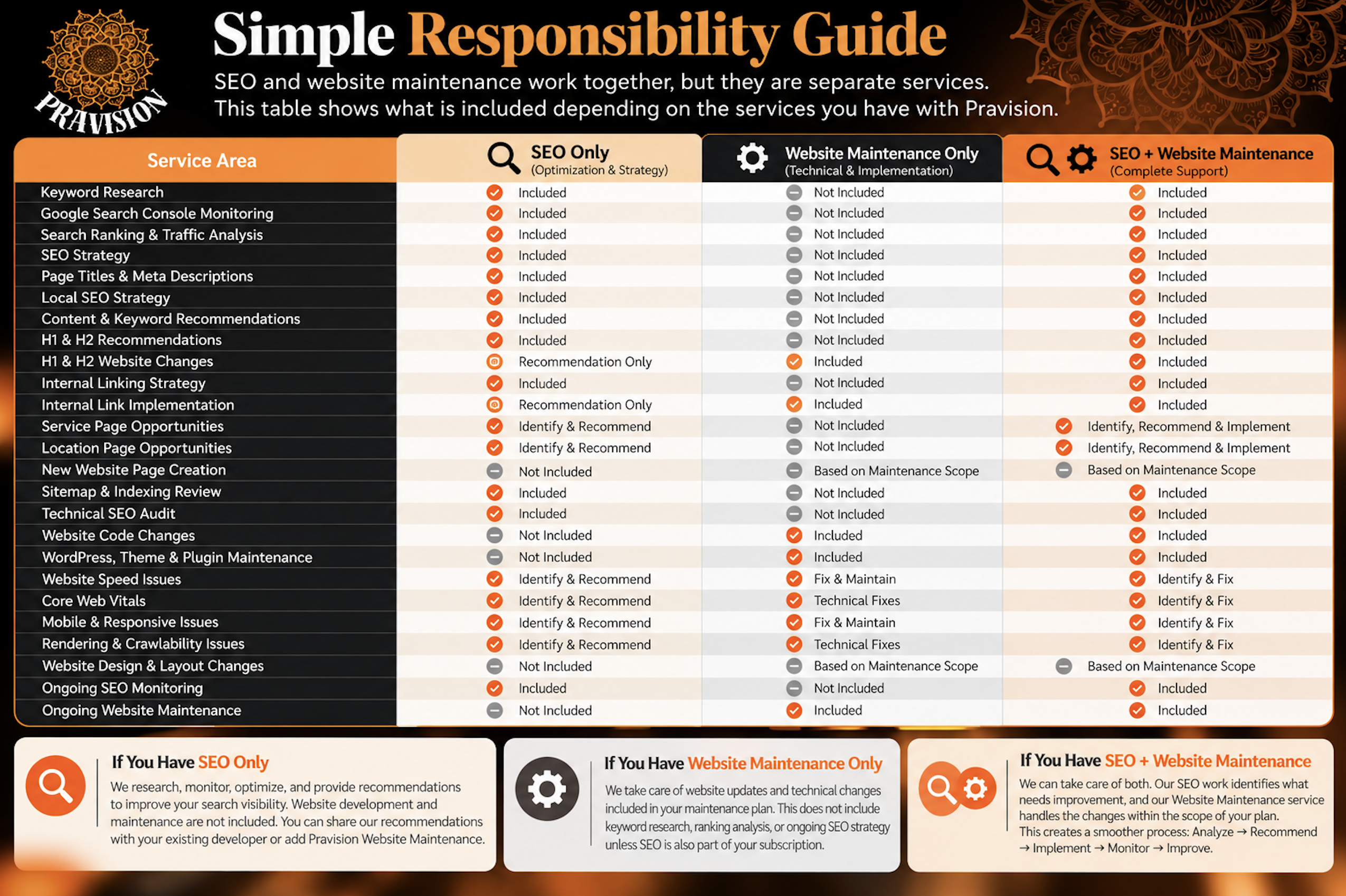
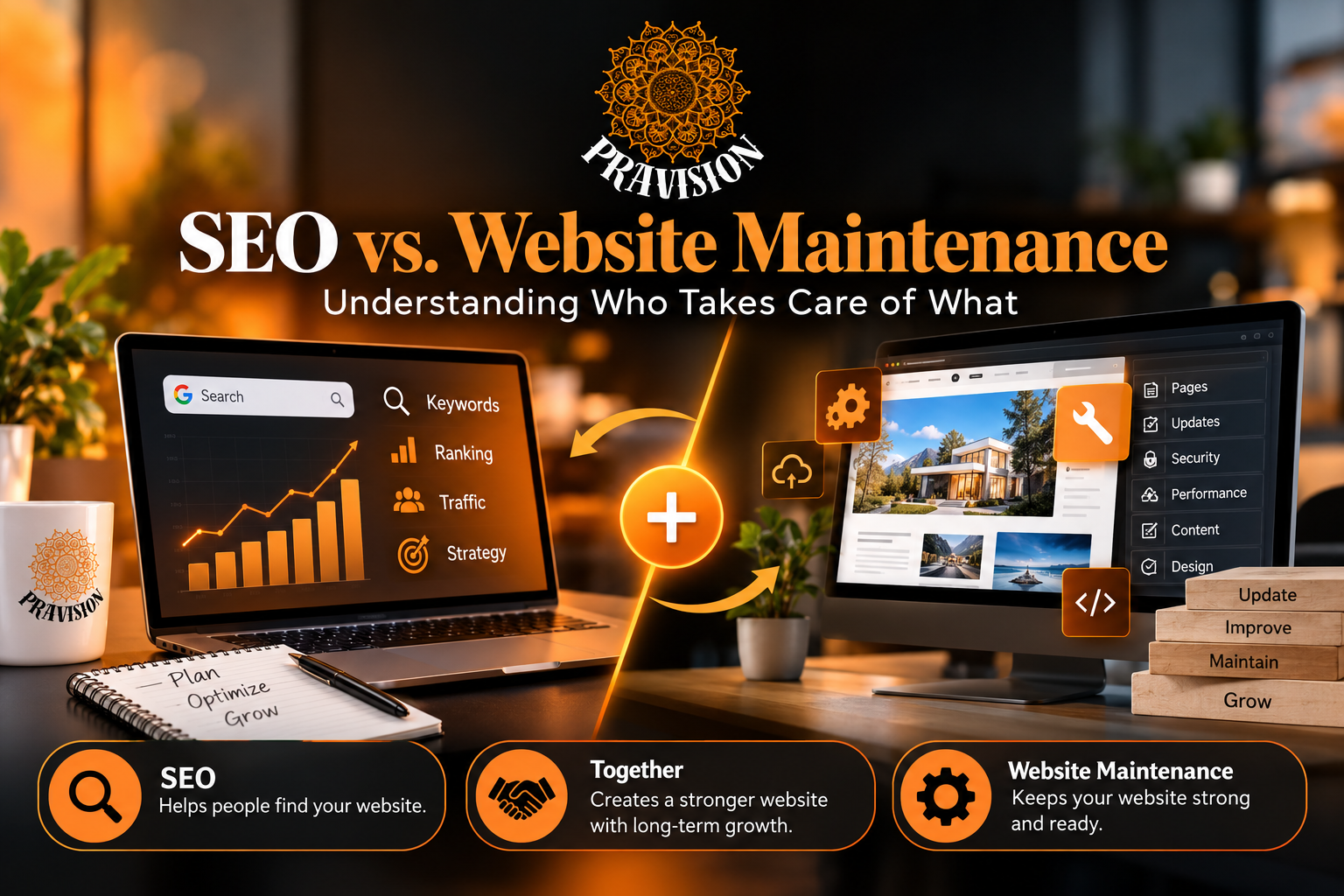
SEO and website maintenance work closely together, but they are two different services. SEO focuses on helping search engines understand your website and helping potential customers find your business. Website maintenance focuses on keeping the website healthy and implementing technical, structural, and content changes when needed.

At Pravision, customers can subscribe to SEO, website maintenance, or both.

When you have both Pravision SEO and Website Maintenance services, we can take care of the SEO strategy as well as the website changes needed to support it.

If you subscribe only to SEO, Pravision will identify SEO opportunities and website issues that may affect your search performance, but website development and maintenance work is not included in the SEO subscription. Those changes will need to be handled by your website developer or through a Pravision Website Maintenance plan.

What Does Pravision SEO Take Care Of?

SEO is about improving your website’s visibility in search engines such as Google.

We look at how your website is performing in search, what potential customers are searching for, which pages Google is finding, and where there are opportunities to improve.

SEO work may include:

  • Keyword research and targeting

  • Google Search Console monitoring

  • Search impressions, clicks, CTR, and ranking analysis

  • Page title and meta description optimization

  • Local SEO strategy

  • Sitemap and indexing review

  • Content and keyword recommendations

  • H1 and H2 heading recommendations

  • Internal linking strategy

  • Image SEO recommendations

  • Competitor and content-gap analysis

  • Identifying opportunities for service and location pages

  • Identifying technical issues that may be affecting search visibility

  • Ongoing SEO monitoring and recommendations

When we find something that can be improved through SEO, we work on that as part of the SEO service.

When we find something that requires changes to the website itself, we will identify and explain the issue.

If Website Maintenance is also part of your Pravision subscription, we can take care of those website changes within the scope of your maintenance plan. If you have SEO only, the website changes will need to be completed separately.

Why Does an SEO Report Find Website Problems?

Because your website is the foundation of SEO.

During an SEO audit, we may find that a page needs better headings, more useful content, stronger internal links, better performance, or a different technical structure.

We may also discover that the business would benefit from new service pages, location pages, FAQs, or other website content.

These findings belong in the SEO report because they can affect search visibility.

However, finding the issue does not always mean that fixing the website itself is included in SEO.

Think of it this way:

SEO identifies what can help your website perform better in search.

Website Maintenance implements changes to the website when technical or structural work is required.

And when you have both services with Pravision, we can manage both sides for you.

SEO Strategy vs. Website Implementation

Here is a simple example.

Suppose SEO research shows that potential customers are searching separately for granite countertops, quartz countertops, marble countertops, and countertop installation.

From an SEO perspective, it may make sense to create individual pages for those services.

Pravision SEO can research the opportunity, determine the keywords, recommend the page titles and headings, and provide direction for the content and internal linking.

Someone still needs to create those pages on the website.

If the customer has Pravision SEO + Website Maintenance, Pravision can handle both the SEO direction and the website implementation based on the scope of those services.

If the customer has Pravision SEO only, we provide the SEO recommendation and direction, while the customer’s website developer or maintenance provider handles the website changes.

With a Pravision SEO-only subscription, we will research, monitor, optimize, and identify opportunities to improve your website’s search visibility.

If our SEO analysis finds an issue that requires changes to your website’s code, design, structure, pages, theme, plugins, or functionality, we will let you know what needs to be addressed.

Website development and maintenance are not included with an SEO-only subscription.

You can share our recommendations with your existing website developer or add Pravision Website Maintenance if you would like us to take care of those changes.

### If You Have Website Maintenance Only

With Pravision Website Maintenance, we take care of website updates and technical changes that are included within your maintenance plan.

Website Maintenance does not automatically include keyword research, ranking analysis, Search Console monitoring, competitor research, or an ongoing SEO strategy unless SEO is also part of your subscription.

### If You Have SEO + Website Maintenance

When you have both Pravision SEO and Website Maintenance, we can take care of both sides.

Our SEO work identifies what needs improvement, and our Website Maintenance service handles the website changes that fall within the scope of your maintenance plan.

This creates a much smoother process:

Analyze → Recommend → Implement → Monitor → Improve

Instead of receiving an SEO recommendation and then having to coordinate with another website provider, Pravision can manage the SEO and website work together.

Some larger projects, such as a complete redesign, custom development, new functionality, or a significant number of new pages, may fall outside the regular maintenance plan. If that happens, we will identify the additional work before moving forward.

What Happens If You Have SEO Only?

If you subscribe to Pravision SEO only, we will continue to monitor, analyze, optimize, and provide recommendations for improving your search visibility.

When we identify a website issue that requires development or maintenance, we will clearly explain what needs attention.

For example, we may tell you:

  • A new service page should be created.

  • A page needs a better heading structure.

  • Website content needs to be reorganized.

  • A technical issue may be preventing search engines from properly reading content.

  • Website performance needs improvement.

These findings and recommendations are part of SEO.

The actual website development or maintenance work is not included in an SEO-only subscription.

You can provide our recommendations to your existing website developer, or you can add Pravision Website Maintenance if you would like Pravision to manage those changes.

What Happens If You Have Both Services?

When you subscribe to Pravision SEO + Website Maintenance, the process becomes much simpler.

Our SEO work can identify what needs improvement, and our website maintenance work can take care of the necessary website changes that fall within the scope of your plan.

Instead of coordinating between separate providers, Pravision can connect the two sides:

Analyze → Recommend → Implement → Monitor → Improve

For example, if SEO identifies that a heading needs to be changed, we can make the website change.

If internal links need to be added, we can implement them.

If a technical website issue is affecting SEO, we can investigate and address it through website maintenance.

If a larger development project is required, such as building several new pages or adding new functionality, we will identify that separately and determine whether it falls within the maintenance plan or requires additional development work.

This keeps the responsibilities clear while allowing SEO and website maintenance to work together.

Why Both Matter

A technically strong website without SEO may look great but still be difficult for potential customers to find.

A strong SEO strategy can also be limited when technical or structural website problems are left unresolved.

That is why the two services complement each other.

SEO helps us understand where the opportunities are.

Website Maintenance helps us make the necessary changes to the website.

When you have both services with Pravision, we can manage that process together.

When you have SEO only, we will continue to identify, optimize, monitor, and recommend, while website development and maintenance remain the responsibility of your website provider.

One Goal, Two Services

Our goal at Pravision is to make responsibilities clear.

We don’t want to simply send an SEO report filled with numbers. We want you to understand what the report means, what Pravision is taking care of, what needs attention on the website, and what the next step should be.

SEO finds and develops the opportunities. Website Maintenance supports the website changes needed to act on them.

And when you have both services with Pravision, we can take care of both sides and keep them working together toward the same goal: a stronger website with better long-term search visibility.


Image Gallery

America’s Drain & Jetting Website Is Live

I’m happy to share another website we designed and developed at Pravision. The new website for America’s Drain & Jetting is officially live.

This was a fun project to work on because we didn’t start with a ready-made template and try to fit the business into it. We created the website around the customer, their services, their logo, and the way they wanted their company to be presented.

The goal was simple. When someone visits the website, it should feel like America’s Drain & Jetting.

We Started With Their Brand

One of the first things we worked on was the color palette.

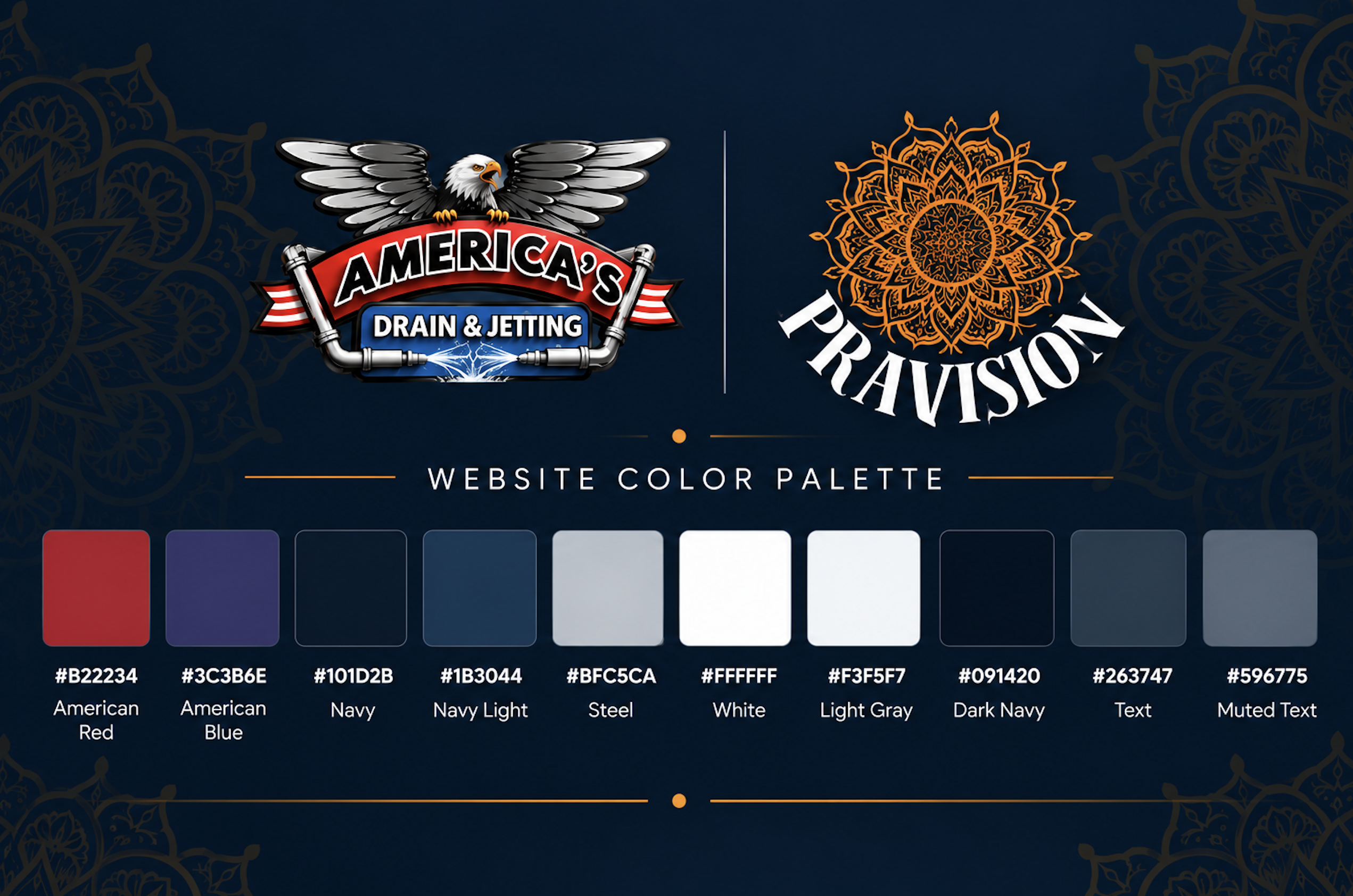
The customer already had a strong logo with an American theme, so instead of introducing completely different website colors, we built the website colors around their logo.

Here is the palette we used:

You can see these colors throughout the website, from the header and buttons to the backgrounds, calls to action, and smaller details.

Everything works together with their existing logo.

No Template. We Created It for Them.

We did not pick a template and replace the pictures and text.

The website was custom created for America’s Drain & Jetting.

The homepage sections, service presentation, calls to action, header, footer, mobile layout, colors, and overall experience were created around this business.

I like working this way because every business is different. Their website should be different too.

Even Uploading Photos Was Made Easier

One thing that can become frustrating during website development is collecting photos from the customer.

Emailing large files back and forth is not always convenient. Asking the customer to log into WordPress, find the Media Library, and upload everything there isn’t ideal either.

So we made that easier.

Using the Pravision Connector, the customer can upload images directly to their website media.

No additional image upload plugin is needed.

They upload the pictures, and they are available for us to use on the website.

Simple.

Forms Without Another Forms Plugin

We also don’t need to keep adding plugins for every little function.

The website does not need a separate forms plugin just to collect a customer inquiry.

And for us, a form submission shouldn’t end with an email notification.

A form submission can become the beginning of the customer workflow.

With Pravision AI, the information can be captured, an email can be sent directly from the form submission, the lead can be saved to the CRM, and the communication can continue from there.

The Website Is Live. Now What?

This is actually one of my favorite parts.

A lot of people think website development ends when the website goes live.

For us, that is only the beginning.

Websites need maintenance. Content changes. Plugins need updates. Themes need updates. Leads come in. Emails need to go out. SEO needs attention. Sometimes the website needs to go into maintenance mode. Sometimes you just need to change something in the header or footer.

Normally, a business owner may have to go into several different places to handle all of this.

That is what we are changing with Pravision AI.

From Pravision, the customer can handle things like website maintenance, form submissions, CRM information, emails from form submissions, email monitoring and replies, header and footer changes, maintenance mode, SEO, .htaccess, sitemap settings, plugin updates, theme updates, and more.

And the customer doesn’t have to do all of this themselves.

They have a choice.

They can use Pravision AI and manage their website themselves, or they can hire us to take care of it for them.

Because sometimes a business owner doesn’t want to spend time updating plugins, changing website content, checking forms, or working on SEO.

They want to run their business.

And that is exactly the point.

More Than Website Development

This is what Pravision is becoming.

We still love designing and developing websites, but we don’t want to stop at handing over a website and saying, “It’s live.”

We want to make what happens after the launch easier too.

Build the website.

Connect the business.

Manage it from one place.

And let the business owner focus on the business.

America’s Drain & Jetting is now officially live, and I’m very happy to see this project out in the world.

Visit America’s Drain & Jetting

Designed and developed by Pravision LLC

Proudly based in Livermore, CA

The Story of Pravision

Reimagining Success for Local & Scaling Businesses

Let’s face it: running a business today means paying a quiet, exhausting “app tax.” Most founders end up drowning in a sea of disconnected tools—switching between different software for their website, CRM, scheduling, bookkeeping, and marketing just to get through the morning.

Pravision was built to end that daily struggle, replacing software bloat with a clean, unified AI operating system that lets you focus on what actually matters.

2020–2021: The COVID Crisis & The Roots of Websiteistic

The story of Pravision started in 2020 when the COVID-19 pandemic hit. As lockdowns swept across California, local brick-and-mortar storefronts were forced to shut their doors overnight. Small business owners were left scrambling to figure out how to get online without clear guidance, technical skills, or huge budgets.

Seeing her community hurting, Praveena Jogi—a tech innovator with over 20 years of digital experience—decided to step in.

┌──────────────────────────────────────────────────────────────┐
│ PRAVEENA JOGI'S PHILOSOPHY │
│ │
│ "Deeply inspired by her father’s core value: │
│ 'Always the giving hand, not the taking hand.'" │
└──────────────────────────────────────────────────────────────┘

Driven by that spirit of giving back, Praveena founded Websiteistic in 2021. The mission was simple: provide local business owners with custom web development, clean branding, and solid SEO so they could survive the lockdowns and stay connected with their customers.

Rooted in Livermore, CA: From Wine Country & Culture to World-Class Tech

Pravision was born in Livermore, California, a unique city situated at the easternmost edge of the San Francisco Bay Area. Often recognized for its rich agricultural heritage, Livermore holds a distinctive place in California’s story:

  • 🍷 California’s Oldest Wine Region: Long before Silicon Valley became the tech capital of the world, the Livermore Valley was established in the 1840s as one of California’s premier wine-growing regions, home to historic vineyards like Wente and Concannon.

  • ⚛️ A Hub of Innovation & Science: Beyond its picturesque vineyards, Livermore is globally famous as a center of scientific discovery. It is home to the world-renowned Lawrence Livermore National Laboratory (LLNL)—where heavy chemical element Livermorium (Lv) was named in honor of the city—and Sandia National Laboratories.

  • 🛕 Spiritual & Cultural Heritage: Livermore is home to the Shiva-Vishnu Temple (Hindu Community and Cultural Center). Established in 1977, this architectural masterpiece features traditional South Indian-style gopurams and serves as a vibrant spiritual, educational, and community service hub for thousands of families across the Bay Area.

  • 💡 The Centennial Light Bulb: Demonstrating a spirit of lasting endurance, Livermore is home to the famous Centennial Light Bulb at Fire Station No. 6, which has been burning continuously since 1901—earning a place in the Guinness World Records as the longest-burning light bulb in history.

It was this exact blend of western community values, rich local heritage, and world-class technological innovation that inspired Praveena Jogi to launch Pravision right here in the Tri-Valley.

Living in a city that balances small-town community care with big-tech ambition reinforced Pravision’s core mission: bringing enterprise-grade AI operations to local business owners who deserve modern tools without Silicon Valley price tags.

The Evolution Timeline: From Local Agency to Unified System

As local businesses survived and started growing again, their tech needs got more complex. Praveena realized that entrepreneurs didn’t just need a website—they needed access to enterprise-grade tools on a small business budget to stay competitive.

2021: THE ROOTS
Websiteistic Founded 
└─ Helped local businesses navigate the pandemic with web design, branding, and local SEO.

2024: THE REBRAND
Pravision LLC
└─ Rebranded and expanded to bridge the gap between high-level enterprise tools and everyday small business budgets.

2025: MILESTONE & LAUNCH
CA Small Business (SB) Certification & The Pravision Console
└─ Earned official State of California certification and launched the proprietary AI-first platform, consolidating CRM, marketing, and back-office ops into one dashboard.

What Makes Pravision Different

Proudly based in Livermore, California, Pravision has evolved from a traditional marketing agency into an advanced AI business operating system for Tri-Valley companies and scaling businesses nationwide.

  • 🖥️ The Unified Pravision Console: Ditch software clutter by managing your website, calendar bookings, CRM, marketing automation, and local SEO in a single interface.

  • 📈 Modular “Pay-for-Growth” Model: Get free access to a core client portal for contracts, billing, and profile management, and only pay when you choose to unlock growth engines like sales and marketing automation.

  • 🔗 Easy Tool Connections: Connects smoothly with tools you already rely on, like Stripe, Google, and OpenPhone, to keep your contacts and data synced.

  • 👕 Turnkey Print & Merch Management: Skip the hassle of finding separate print vendors or managing orders yourself. Pravision completely takes care of designing, printing, and delivering custom t-shirts, backpacks, flyers, and pens right to your door.

  • 📲 Custom App Development: Outgrown standard tools? Pravision’s engineering team designs and builds custom web and mobile apps tailored to your specific operations.

The Heart Behind the Brand: Symbolism of the Orange Chakra

The Pravision logo features a vibrant orange chakra. Inspired by the sacred Sudarshana Chakra of Lord Sri Venkateswara (Maha Vishnu)—the celestial disc that protects the righteous, cuts through obstacles, and restores order—the emblem carries deep personal and symbolic meaning:

  • ⚡ Energy & Divine Guidance: The vibrant orange hue symbolizes creative energy, passion, and continuous motion.

  • 🛡️ Protection & Clarity of Purpose: Just as the Sudarshana Chakra represents divine protection and cosmic clarity, Pravision stands as an operational shield for entrepreneurs—cutting through administrative chaos and software obstacles so businesses can thrive.

  • 🔄 Dynamic Growth & Perfection: The circular wheel represents the ongoing pursuit of perfection, innovation, and unstoppable momentum in an ever-evolving digital world.

Recognized by Marquis Who’s Who for standout leadership in technology and sales transformation, Praveena Jogi leads Pravision as CEO & Lead Architect—helping entrepreneurs reclaim their time, strip away software clutter, and build lasting success.

The Hidden “App Tax” Sucking the Time Out of Your Tutoring Business

If you run a tutoring business, your day probably looks something like this:

You check your email on one tab, open Calendly to fix a scheduling conflict between a tutor and a student, log into separate accounting software to check an invoice, switch to VistaPrint to reorder branded pens, and open a spreadsheet to check on a new student inquiry.

By 10:00 AM, you haven’t taught a single student—you’ve just paid the “App Tax.” You’re paying hundreds of dollars a month for multiple software subscriptions that force you to play administrative manager instead of educator.

Whether you run a single local center or manage a network of online tutors nationwide, Pravision was built to eliminate that chaos. Pravision isn’t a collection of third-party integrations taped together—everything is built directly into our unified system out of the box.

  • A Professional Front Door That Enrolls Students: We build custom, high-converting websites directly on the platform. Your site builds instant trust with parents and guides them seamlessly toward booking their first session.

  • Built-in CRM & Bookkeeping: Manage student leads, parent contacts, session notes, billing, and full bookkeeping natively inside Pravision. No separate accounting software, no external CRM subscriptions, and no messy spreadsheets.

  • Built-in Multi-Calendar Scheduling (Ditch Calendly): Stop paying extra monthly fees for standalone booking apps like Calendly. Pravision comes with native scheduling built right in. Connect every tutor’s calendar in real time, let parents book open slots in seconds, and check availability across your entire team automatically.

  • Built-in Print & Merch Operations: Need t-shirts for your staff, branded backpacks for your students, or flyers for local schools? Skip the hassle of finding a local printer or navigating online vendors. Pravision designs, prints, and delivers pens, notebooks, apparel, and marketing materials straight to your door.

  • Custom App Development on Demand: Outgrown standard tools? If you need a fully custom student portal, an interactive learning tool, or a proprietary mobile app tailored to your exact curriculum, Pravision can build and deploy custom software from scratch.

Focus on the Next Generation You didn’t start a tutoring business to juggle software subscriptions and third-party tools. You started it to help students unlock their potential and build confidence.

Pravision handles the tech, operations, and logistics inside a unified system so you can get back to what actually matters: shaping the future.

How to Write a Resume That Gets Interviews in 2026

Flat lay graphic with resume icons, text overlay reading "how to write a resume that gets interviews in 2024"

Learning how to write a resume that gets interviews in 2026 is more critical than ever in today’s competitive job market. With artificial intelligence screening systems, evolving recruiter expectations, and new digital hiring platforms, your resume needs to be strategically crafted to stand out. This comprehensive guide will walk you through every step of creating a resume that not only passes automated screening but compels hiring managers to schedule that crucial interview.

Understanding Modern Resume Requirements in 2026

The landscape of resume writing has transformed dramatically. Today’s resumes must satisfy both AI-powered Applicant Tracking Systems (ATS) and human recruiters. According to current hiring trends, over 95% of Fortune 500 companies now use advanced ATS software with machine learning capabilities that go beyond simple keyword matching.

Your resume must be designed with a dual purpose: machine readability and human appeal. This means incorporating relevant keywords naturally while maintaining compelling storytelling that showcases your unique value proposition. The most successful resumes in 2026 balance technical optimization with authentic personal branding.

The Role of AI in Resume Screening

Modern ATS systems use natural language processing and semantic analysis to evaluate resumes. These systems don’t just look for exact keyword matches—they understand context, assess skill relevance, and even predict candidate success based on historical hiring data. Your resume should incorporate industry-specific terminology while demonstrating concrete achievements that AI algorithms can quantify and rank.

Essential Components of an Interview-Winning Resume

To write a resume that gets interviews in 2026, you must include these critical elements structured in a way that maximizes both ATS compatibility and recruiter engagement.

Strategic Contact Information and Header

Start with a clean, professional header containing your full name, phone number, professional email address, LinkedIn profile URL, and optionally your portfolio website or relevant social media profiles. Avoid graphics, logos, or unusual formatting in this section as they can confuse ATS systems.

Compelling Professional Summary

Replace outdated objective statements with a powerful professional summary of 3-4 sentences. This section should immediately communicate your value proposition, years of experience, key expertise areas, and most impressive achievement. Use dynamic action words and quantifiable metrics whenever possible.

Skills Section Optimized for ATS

Create a dedicated skills section that includes both hard and soft skills relevant to your target position. Include:

  • Technical skills and software proficiencies
  • Industry-specific certifications and qualifications
  • Relevant soft skills like leadership, communication, and problem-solving
  • Emerging skills like AI tools, data analytics, or automation platforms

List these skills using the exact terminology found in job descriptions to ensure ATS recognition.

Results-Driven Work Experience

This is the most critical section of your resume. For each position, include your job title, company name, location, and dates of employment. Follow with 3-5 bullet points that emphasize achievements rather than responsibilities. Use the CAR method (Challenge-Action-Result) to structure your accomplishments:

  • Challenge: Briefly describe the problem or situation
  • Action: Explain what you specifically did
  • Result: Quantify the outcome with metrics, percentages, or dollar amounts

For example: “Redesigned customer onboarding process (Challenge), implementing automated workflows and personalized touchpoints (Action), resulting in 47% reduction in churn and $2.3M additional annual revenue (Result).”

Education and Certifications

List your educational background in reverse chronological order, including degree type, major, institution name, and graduation year. If you’re a recent graduate, you can include relevant coursework, academic honors, or significant projects. For experienced professionals, keep this section concise and move it toward the end of your resume.

Formatting Best Practices for Maximum Impact

How you format your resume is just as important as what you include. In 2026, certain formatting principles are essential for ensuring both ATS compatibility and visual appeal.

Choose the Right Resume Format

The reverse-chronological format remains the most effective and ATS-friendly option. It lists your work experience starting with your most recent position and working backward. This format works for most job seekers and is preferred by 90% of recruiters.

Functional or skills-based formats should be avoided unless you’re making a significant career change, as ATS systems often struggle to parse them correctly.

Typography and Visual Design

Use standard, professional fonts like Arial, Calibri, Georgia, or Garamond in 10-12 point size. Maintain consistent formatting throughout with clear section headers in bold or slightly larger font. Use adequate white space to improve readability—margins should be 0.5 to 1 inch on all sides.

Avoid tables, text boxes, headers, footers, columns, and graphics that can confuse ATS parsing algorithms. Stick to standard bullet points and simple formatting.

Optimal Resume Length

For most professionals, a one-page resume is ideal if you have less than 10 years of experience. Two pages are acceptable for senior-level positions or extensive relevant experience. Never exceed two pages unless you’re in academia or a field where comprehensive publication lists are expected.

Advanced Strategies to Optimize Your Resume for Interviews

Beyond the basics, these advanced techniques will significantly increase your chances of landing interviews.

Keyword Optimization Without Stuffing

Analyze 5-10 job descriptions for your target role and identify recurring keywords and phrases. Incorporate these naturally throughout your resume, particularly in your skills section and work experience bullet points. Focus on role-specific terminology, required qualifications, and industry jargon that demonstrates your expertise.

However, avoid keyword stuffing—modern AI can detect this and may flag your resume as spam. Every keyword should appear in meaningful context that demonstrates actual experience or capability.

Quantify Everything Possible

Numbers catch both ATS algorithms and human eyes. Wherever possible, include specific metrics:

  • Revenue generated or costs saved (dollar amounts)
  • Percentage improvements or growth rates
  • Team sizes you’ve managed
  • Number of clients, projects, or accounts handled
  • Timeframes that demonstrate efficiency

Even if your role isn’t traditionally metrics-driven, find ways to quantify impact. Instead of “Managed social media accounts,” write “Grew social media following by 340% across 4 platforms, driving 12,000+ monthly website visits.”

Tailor Each Resume to the Specific Job

Generic resumes get generic results. The most successful approach to writing a resume that gets interviews in 2026 is customization. Create a master resume with all your experiences and achievements, then create targeted versions for each application by:

  • Adjusting your professional summary to match the role
  • Reordering skills to prioritize those mentioned in the job description
  • Emphasizing relevant experiences and accomplishments
  • Using the company’s language and terminology

This targeted approach may take more time, but it dramatically increases your interview rate.

Include Modern Competencies

In 2026, certain skills and experiences signal that you’re a forward-thinking professional. When relevant, highlight your experience with:

  • AI tools and automation platforms
  • Remote collaboration and digital workspace tools
  • Data analysis and visualization
  • Sustainability initiatives or ESG considerations
  • Diversity, equity, and inclusion efforts
  • Agile methodologies and adaptive project management

Common Resume Mistakes That Kill Your Interview Chances

Avoid these critical errors that immediately disqualify candidates:

Spelling and Grammar Errors: Even minor typos signal carelessness. Use spell-check, grammar tools, and have multiple people proofread your resume before submitting.

Unprofessional Email Addresses: Create a professional email address using your name. Addresses like “partyguy123@email.com” will get your resume rejected immediately.

Irrelevant Information: Leave out personal details like age, marital status, photo (unless specifically requested), or hobbies unless directly relevant to the position.

Employment Gaps Without Explanation: If you have significant gaps, address them briefly and positively. Focus on any skills developed, consulting work, or professional development during those periods.

Passive Language: Replace weak phrases like “responsible for” or “duties included” with strong action verbs like “spearheaded,” “optimized,” “launched,” or “transformed.”

Outdated or Irrelevant Experience: Focus on the last 10-15 years of relevant experience. You can summarize earlier career history briefly or omit it entirely if it doesn’t add value.

Testing and Refining Your Resume

Before submitting your resume, take these steps to ensure it’s optimized:

Use online ATS checkers and resume scanners to identify potential parsing issues. Many free tools can show you how an ATS reads your resume and highlight areas for improvement.

Save your resume as both a .docx and PDF file. While PDFs preserve formatting, some older ATS systems prefer Word documents. Check the application instructions for guidance.

Test different versions by tracking which resume variations lead to more interview requests. Keep notes on what works and continuously refine your approach.

Get feedback from professionals in your industry, career coaches, or trusted colleagues who can provide objective insights on how your resume presents your qualifications.

Frequently Asked Questions

How long should my resume be in 2026?

For most professionals, one page is ideal for up to 10 years of experience. Two pages are appropriate for senior roles or extensive relevant experience. Focus on quality over quantity—every line should add value. Never exceed two pages unless you’re in a field like academia where comprehensive listings are expected.

Should I include a photo on my resume?

In most countries including the United States, do not include a photo on your resume. Photos can introduce bias and many companies remove them to ensure fair evaluation. Only include a photo if it’s specifically requested or customary in your country or industry. Focus instead on compelling content that demonstrates your qualifications.

How do I optimize my resume for ATS systems?

To optimize for ATS: use a simple, clean format without graphics or tables; include relevant keywords from the job description naturally throughout your resume; use standard section headings like “Work Experience” and “Education”; save in .docx or PDF format as specified; avoid headers, footers, and text boxes; and use standard fonts. Most importantly, tailor your resume to each specific job application.

What’s the difference between a resume and a CV in 2026?

A resume is a concise 1-2 page document highlighting your most relevant skills and experiences for a specific job. A CV (curriculum vitae) is a comprehensive document that includes your entire academic and professional history, publications, presentations, and research. In the US, resumes are used for most jobs while CVs are primarily for academic, research, or medical positions. In many other countries, the terms are used interchangeably.

How often should I update my resume?

Update your resume at least every 3-6 months, even when not actively job searching. Add new accomplishments, skills, certifications, and quantifiable results as you achieve them. This makes it easier to recall specific details and ensures you’re always ready for unexpected opportunities. Keep a running document of achievements so you never forget important accomplishments when it’s time to apply for positions.

Best AI Video Analytics Software for Business Security 2026

Pravisión logo with orange mandala design surrounded by AI, security, and analytics icons on digital circuit background.

Finding the best AI video analytics software for business security has become essential for organizations looking to protect their assets, employees, and customers in 2026. As security threats evolve and surveillance technology advances, businesses need intelligent solutions that go beyond traditional video monitoring to provide real-time insights, predictive alerts, and automated threat detection.

Modern AI-powered video analytics platforms transform passive security cameras into proactive defense systems, leveraging computer vision, deep learning, and advanced algorithms to detect anomalies, recognize patterns, and alert security teams before incidents escalate. This comprehensive guide explores the leading solutions available today and helps you choose the right platform for your business needs.

What Is AI Video Analytics Software?

AI video analytics software uses artificial intelligence and machine learning algorithms to automatically analyze video footage in real-time or retrospectively. Unlike traditional surveillance systems that simply record footage for later review, these intelligent platforms actively monitor, interpret, and respond to events as they occur.

The technology employs computer vision to identify objects, people, vehicles, and behaviors within video streams. Advanced neural networks enable these systems to distinguish between normal activity and potential security threats, reducing false alarms while ensuring genuine incidents receive immediate attention.

Key capabilities of modern AI video analytics include facial recognition, license plate reading, crowd detection, perimeter intrusion alerts, abandoned object identification, and behavioral analysis. These features work together to create a comprehensive security ecosystem that protects businesses more effectively than ever before.

Top Features to Look for in AI Video Analytics Software

When evaluating the best AI video analytics software for business security, certain features separate exceptional solutions from basic offerings. Understanding these capabilities helps you make an informed decision that aligns with your security requirements and budget.

Real-Time Threat Detection and Alerts

The most valuable AI video analytics platforms provide instant notifications when suspicious activities occur. Look for solutions that offer customizable alert parameters, allowing you to define what constitutes a threat for your specific environment. Advanced systems use predictive analytics to identify potential security breaches before they happen, giving your team precious time to respond.

Object and Facial Recognition

Sophisticated recognition capabilities enable your security system to identify specific individuals, vehicles, or objects across multiple camera feeds. This feature proves invaluable for access control, tracking unauthorized personnel, and creating watchlists of persons of interest. The best platforms achieve recognition accuracy rates exceeding 98% even in challenging lighting conditions.

Behavioral Analysis and Pattern Recognition

Advanced AI algorithms can learn normal behavioral patterns within your facility and flag deviations that might indicate security risks. Whether it’s detecting loitering near restricted areas, identifying unusual traffic patterns, or recognizing aggressive behaviors, these intelligent systems provide context-aware security monitoring.

Integration Capabilities

Your AI video analytics software should seamlessly integrate with existing security infrastructure, including access control systems, alarm panels, and emergency response protocols. Cloud-based platforms offer particular advantages for multi-site businesses, enabling centralized monitoring and management across all locations.

Leading AI Video Analytics Platforms for Business Security in 2026

The market for AI-powered security solutions has matured significantly, with several platforms emerging as industry leaders. Here are the top contenders offering the best AI video analytics software for business security this year.

Enterprise-Grade Solutions

Verkada Command: This cloud-managed platform combines cameras, software, and AI analytics in a unified ecosystem. Verkada excels in scalability, making it ideal for businesses with multiple locations. The system offers unlimited cloud archiving, person of interest alerts, and powerful search capabilities that let you find specific people or vehicles across your entire camera network within seconds.

Avigilon Unity: Known for exceptional video quality and advanced analytics, Avigilon Unity provides comprehensive security intelligence with focus-of-attention technology that highlights unusual motion in crowded scenes. The platform’s appearance search feature enables security teams to quickly locate individuals based on clothing color, gender, and other physical characteristics.

Genetec Security Center: This open-architecture platform unifies video surveillance, access control, and license plate recognition in a single interface. Genetec’s AI-powered analytics include people counting, heat mapping, and retail-specific features like queue management and occupancy monitoring.

Mid-Market and Scalable Options

Eagle Eye Networks: This cloud-based solution offers flexible deployment options and robust AI analytics at competitive pricing. Eagle Eye’s platform includes advanced search, motion detection, and integration with third-party analytics applications, making it suitable for growing businesses.

Rhombus: Designed for ease of use, Rhombus provides plug-and-play cameras with built-in AI analytics and unlimited cloud storage. The platform’s intuitive interface and automatic software updates make it attractive for businesses without dedicated IT security teams.

DeepAlert AI: Specializing in behavioral analytics, DeepAlert uses deep learning to identify complex security scenarios including slip-and-fall incidents, workplace violence indicators, and unauthorized area access. The system’s low false-alarm rate makes it particularly valuable for businesses seeking to reduce security team fatigue.

Implementation Considerations and Best Practices

Selecting the best AI video analytics software for business security represents only the first step. Successful implementation requires careful planning and adherence to proven practices that maximize your investment’s value.

Assessing Your Security Requirements

Begin by conducting a comprehensive security audit that identifies your facility’s vulnerabilities, high-risk areas, and specific threats. Different industries face distinct challenges—retail environments prioritize theft prevention and customer safety, while manufacturing facilities focus on perimeter security and workplace safety compliance. Understanding your unique needs ensures you select a platform with the right feature set.

Camera Placement and Coverage

AI analytics perform only as well as the video quality they receive. Strategic camera placement ensures optimal coverage of critical areas while minimizing blind spots. Consider lighting conditions, camera angles, and resolution requirements for effective facial recognition and object detection. Most experts recommend minimum 4MP resolution for reliable AI analytics performance.

Privacy and Compliance

In 2026, data privacy regulations continue evolving globally. Your chosen platform must comply with GDPR, CCPA, and industry-specific requirements relevant to your business. Look for solutions offering privacy masking, data encryption, and configurable retention policies. Transparent data handling practices protect your organization from legal liability while maintaining stakeholder trust.

Training and Change Management

Even the most sophisticated AI video analytics software requires proper training for security personnel. Invest in comprehensive onboarding that covers system operation, alert response protocols, and troubleshooting procedures. Establish clear policies governing system use, investigation procedures, and evidence handling to ensure consistent, effective security operations.

ROI and Cost Considerations

Understanding the financial implications of AI video analytics helps justify your investment and set realistic expectations for returns. While premium platforms command higher upfront costs, they often deliver superior long-term value through reduced security incidents, lower insurance premiums, and operational efficiencies.

Typical pricing models include per-camera licensing fees ranging from $200 to $800 annually for cloud-based solutions, or perpetual licenses with maintenance contracts for on-premises deployments. Enterprise platforms may charge based on the number of monitored locations or concurrent users rather than individual cameras.

Calculate total cost of ownership by including hardware expenses, installation costs, training investment, and ongoing subscription or maintenance fees. Many businesses recoup their investment within 18-24 months through prevented losses, reduced security staffing requirements, and insurance premium reductions.

Beyond direct cost savings, AI video analytics provides valuable business intelligence. Retail operations use heat mapping and traffic analysis to optimize store layouts. Manufacturing facilities leverage safety analytics to reduce workplace injuries and associated costs. These secondary benefits often exceed the primary security value.

Future Trends in AI Video Analytics

The AI video analytics landscape continues evolving rapidly as technology advances. Understanding emerging trends helps you select a platform that remains relevant as capabilities expand.

Edge computing integration represents a significant development, with more AI processing occurring directly on cameras rather than in the cloud or central servers. This architecture reduces bandwidth requirements, improves response times, and enhances privacy by minimizing data transmission.

Multi-modal analytics combining video with audio, thermal imaging, and IoT sensor data creates more comprehensive security intelligence. These integrated systems provide contextual awareness that single-source analytics cannot match.

Predictive analytics powered by machine learning models trained on historical incident data will increasingly anticipate security threats before they materialize. This proactive approach represents the next frontier in business security, shifting from reactive response to preventive intervention.

Ethical AI and bias mitigation have become central concerns, with leading vendors investing heavily in fairness testing and algorithm transparency. Businesses should prioritize solutions from vendors demonstrating commitment to responsible AI development and deployment.

Frequently Asked Questions

What is the difference between traditional video surveillance and AI video analytics?

Traditional video surveillance systems passively record footage for later review by human operators, while AI video analytics actively monitors streams in real-time, automatically detecting threats, recognizing patterns, and generating intelligent alerts. AI-powered systems significantly reduce the burden on security staff by filtering out irrelevant events and highlighting genuine security concerns, making them far more effective for modern business security needs.

How accurate is AI video analytics software in detecting security threats?

The best AI video analytics software for business security in 2026 achieves accuracy rates exceeding 95-98% for object detection and facial recognition under optimal conditions. Accuracy depends on factors including video quality, lighting, camera angles, and the specific algorithms employed. Advanced platforms use continuous learning to improve detection accuracy over time, while customizable sensitivity settings help balance between capturing all potential threats and minimizing false alarms.

Can AI video analytics integrate with my existing security cameras?

Many modern AI video analytics platforms support integration with existing IP cameras through standard protocols like ONVIF and RTSP. However, optimal performance typically requires cameras meeting minimum specifications for resolution (usually 4MP or higher), frame rate, and processing capability. Some advanced features like edge analytics require compatible hardware. Cloud-based analytics platforms offer the most flexibility for existing camera integration, though upgrading older analog systems to IP cameras may be necessary.

What are the privacy implications of using AI video analytics for business security?

AI video analytics platforms must comply with data protection regulations including GDPR, CCPA, and industry-specific requirements. Reputable solutions offer privacy features such as automatic face blurring, configurable data retention periods, encrypted storage, and detailed access logs. Businesses should implement clear policies governing system use, ensure transparency with employees and visitors about surveillance practices, and limit data collection to legitimate security purposes. Working with vendors who prioritize privacy by design helps mitigate legal and ethical risks.

How much does AI video analytics software cost for a typical business?

Pricing varies significantly based on the number of cameras, deployment model (cloud vs. on-premises), and feature requirements. Cloud-based solutions typically charge $200-$800 per camera annually, while enterprise platforms may use site-based or user-based licensing. A small business with 10-20 cameras might expect annual costs of $3,000-$8,000, while mid-sized operations with 50-100 cameras could invest $15,000-$40,000 yearly. Enterprise deployments across multiple locations often negotiate custom pricing. Remember to factor in hardware costs, installation, training, and ongoing support when calculating total investment.


Hiring a Website Designer

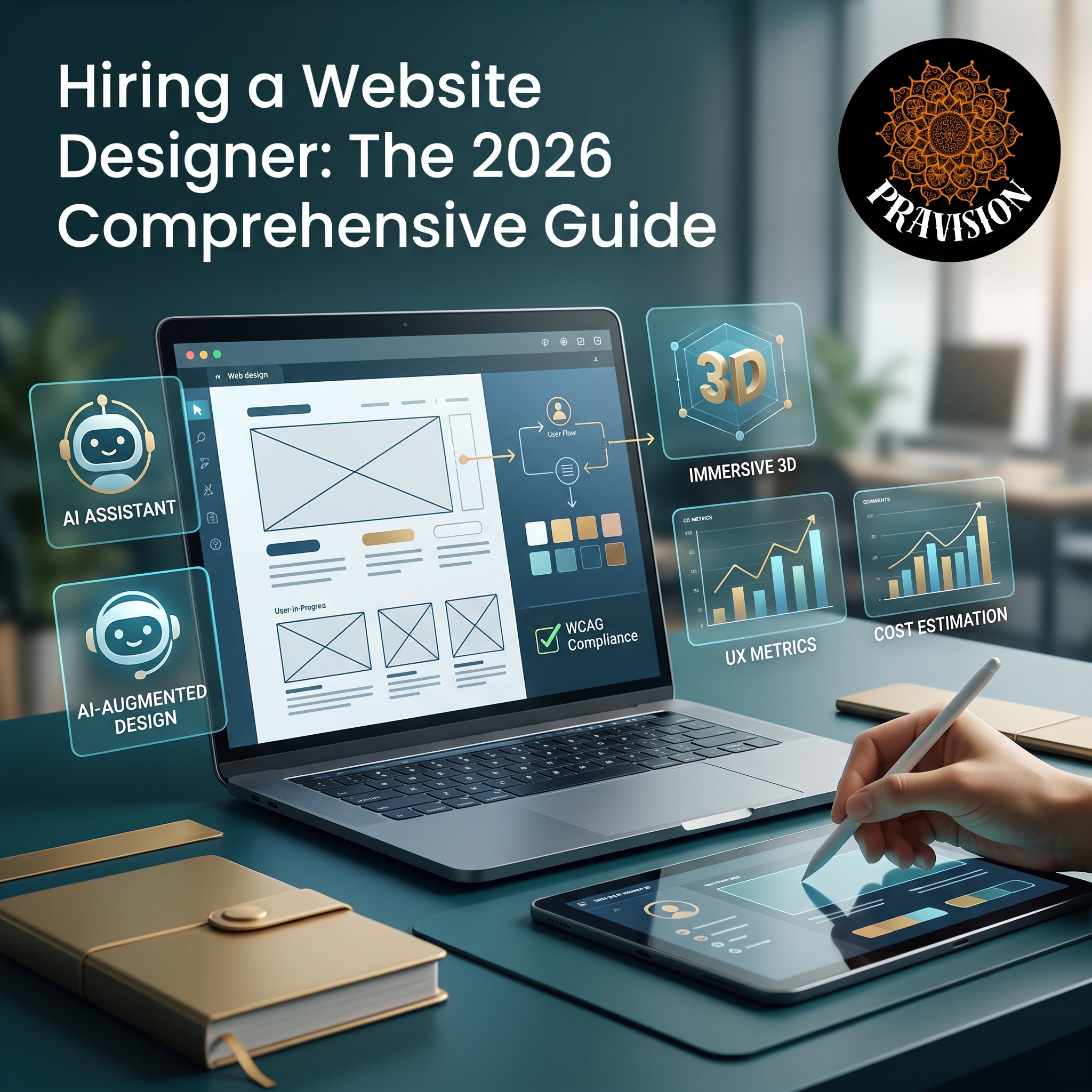
Laptop displaying website design wireframes with AI assistant and augmented design tools, alongside tablet showing 3D immersive, UX metrics, and cost estimation features; Pravision logo in top right corner.

Finding the right website designer can be the difference between a digital presence that drives growth and one that falls flat. Whether you’re launching a startup, rebranding an established business, or simply need a website refresh, understanding what makes an exceptional website designer and how to work with one is crucial for success in 2026’s competitive digital landscape.

This comprehensive guide will walk you through everything you need to know about hiring a website designer, from understanding their role and evaluating their skills to managing costs and ensuring a successful collaboration.

What Does a Website Designer Do in 2026?

A website designer is a professional who creates the visual layout, user interface, and overall aesthetic of websites. Unlike web developers who focus on coding and functionality, designers concentrate on the look, feel, and user experience of your digital presence.

In 2026, the role of a website designer has evolved significantly with the integration of AI-assisted design tools, advanced prototyping software, and a deeper understanding of neurodesign principles. Modern website designers typically handle:

  • Visual design: Creating color schemes, typography, imagery, and overall brand consistency
  • User experience (UX): Designing intuitive navigation and user flows that guide visitors toward conversion
  • Responsive design: Ensuring websites function perfectly across all devices, from smartphones to large desktop displays
  • Accessibility compliance: Making websites usable for people with disabilities, meeting WCAG standards
  • AI integration: Incorporating intelligent chatbots, personalization features, and dynamic content
  • Performance optimization: Designing with page speed and Core Web Vitals in mind

The best website designers combine artistic creativity with strategic thinking, understanding that beautiful design must also drive business results.

Types of Website Designers: Finding Your Perfect Match

Not all website designers specialize in the same areas. Understanding the different types can help you find the right fit for your project.

Freelance Website Designers

Independent designers offer flexibility and often more affordable rates. They’re ideal for small to medium-sized projects and businesses that want direct communication with their designer. Freelance website designers typically have diverse portfolios spanning multiple industries and can provide personalized attention to your project.

Website Design Agencies

Agencies provide comprehensive services with teams of specialists including designers, developers, strategists, and project managers. They’re best suited for complex projects requiring multiple skill sets, ongoing support, or enterprise-level solutions. While more expensive, agencies offer accountability and broader expertise.

In-House Website Designers

For companies with continuous design needs, hiring a full-time website designer makes sense. This option provides deep brand knowledge and immediate availability but requires a significant financial commitment and may lack the diverse perspective outside designers bring.

Specialized vs. Generalist Designers

Some designers specialize in specific industries (e-commerce, healthcare, finance) or design types (minimalist, interactive, immersive). Specialists bring deep domain knowledge, while generalists offer versatility. Consider your project’s unique requirements when choosing.

How to Evaluate a Website Designer: Key Criteria

Choosing the right website designer requires careful evaluation. Here are the essential factors to consider:

Portfolio Quality and Relevance

Review their previous work for aesthetic appeal, functionality, and diversity. Look for projects similar to yours in scope and industry. Pay attention to mobile responsiveness, loading speeds, and how designs have aged over time. In 2026, also examine how well they’ve integrated emerging technologies like AI personalization and immersive experiences.

Technical Proficiency

Today’s website designers should be proficient in industry-standard tools including Figma, Adobe XD, Sketch, and AI-powered design assistants. They should understand design systems, component libraries, and how their designs translate to code. Ask about their familiarity with popular content management systems like WordPress, Webflow, or Shopify.

Communication and Collaboration Skills

Great designers listen actively, ask probing questions, and can explain design decisions in business terms. They should be comfortable receiving feedback and iterating on designs. During initial conversations, assess their responsiveness and whether they understand your business goals beyond just aesthetics.

Understanding of User Experience Principles

The most visually stunning website fails if users can’t navigate it effectively. Your website designer should demonstrate knowledge of UX research, user testing methodologies, conversion optimization, and accessibility standards. Ask how they approach user journey mapping and what metrics they use to measure design success.

Timeline and Process Transparency

Professional designers follow structured processes with clear milestones, deliverables, and revision policies. They should provide realistic timelines and communicate proactively about any potential delays. Understand their design process from discovery through delivery and ongoing support.

Website Designer Costs: What to Expect in 2026

Pricing for website design services varies dramatically based on complexity, designer experience, and project scope. Understanding current market rates helps you budget appropriately and avoid both overpriced and suspiciously cheap options.

Freelance Designer Rates

Freelance website designers typically charge between $50-$200 per hour, with experienced specialists commanding premium rates. Project-based pricing for small business websites ranges from $2,000-$10,000, while more complex sites can cost $10,000-$50,000+. Entry-level designers may offer lower rates but require more guidance and revisions.

Agency Pricing

Design agencies generally charge $100-$300+ per hour, with comprehensive website projects starting around $10,000 and scaling to $100,000+ for enterprise solutions. Agencies include strategy, multiple rounds of revisions, and often provide ongoing support packages.

Factors Affecting Cost

Several elements influence final pricing: website complexity and number of pages, custom illustrations or photography requirements, e-commerce functionality, third-party integrations, SEO optimization, content creation, and post-launch support. AI-powered personalization features and advanced interactive elements also add to costs.

Hidden Costs to Consider

Beyond the initial design fee, budget for domain registration, hosting services, premium plugins or themes, stock imagery licenses, ongoing maintenance, and future updates. Clarify what’s included in the quoted price to avoid surprises.

Working Successfully with Your Website Designer

The designer-client relationship significantly impacts project outcomes. Follow these best practices for optimal collaboration:

Prepare a comprehensive brief: Before engaging a website designer, document your business goals, target audience, competitor examples, brand guidelines, preferred and disliked styles, required features, and budget constraints. Clear direction upfront prevents misalignment later.

Establish clear communication channels: Agree on preferred communication methods, response time expectations, and regular check-in schedules. Use project management tools to centralize feedback and track progress.

Provide constructive feedback: When reviewing designs, explain the reasoning behind requested changes rather than just stating preferences. Frame feedback around user needs and business objectives rather than personal taste.

Trust their expertise: You hired a professional for their skills and experience. While your input is valuable, remain open to their recommendations, especially regarding user experience and current design best practices.

Plan for iterations: Rarely is the first design concept perfect. Budget time and resources for revisions, understanding that refinement is part of the creative process.

Red Flags: Warning Signs to Avoid

Not every website designer delivers quality results. Watch for these warning signs:

  • Portfolios filled with template-based designs with minimal customization
  • Inability to explain design decisions or discuss UX principles
  • Reluctance to provide references or case studies
  • Unrealistically low prices that seem too good to be true
  • Poor communication or delayed responses during the sales process
  • No formal contract or vague project scope documentation
  • Pressure to start immediately without proper discovery
  • Ownership rights issues regarding final design files

Trust your instincts—if something feels off during initial interactions, it likely won’t improve during the project.

The Future of Website Design: Trends Shaping 2026

Understanding current trends helps you evaluate whether a website designer stays current with industry evolution:

AI-augmented design: Leading designers leverage AI tools for rapid prototyping, automated accessibility testing, and data-driven design decisions while maintaining creative control.

Immersive 3D experiences: WebGL and WebGPU technologies enable sophisticated 3D elements without sacrificing performance, creating more engaging user experiences.

Hyper-personalization: Websites now dynamically adapt content, layouts, and calls-to-action based on user behavior, preferences, and context.

Sustainability-focused design: Energy-efficient websites with optimized assets and code are increasingly important as environmental consciousness grows.

Voice and gesture interfaces: Forward-thinking designers consider multi-modal interactions beyond traditional clicking and scrolling.

Frequently Asked Questions About Website Designers

How long does it take a website designer to complete a project?

Timeline varies based on project complexity. Simple small business websites typically require 4-6 weeks, while comprehensive e-commerce sites or custom web applications may take 3-6 months. Factors affecting duration include revision rounds, content availability, stakeholder approval processes, and designer workload. Discuss realistic timelines during initial consultations and build in buffer time for unexpected delays.

What’s the difference between a website designer and a web developer?

A website designer focuses on visual aesthetics, user interface, and user experience—essentially how the website looks and feels. Web developers handle the technical implementation, writing code to bring designs to life and ensure functionality. Many professionals offer both services, while others specialize in one area. For complex projects, you may need both a designer for creative aspects and a developer for technical execution.

Should I hire a local website designer or work remotely?

Both approaches have merits. Local designers enable face-to-face meetings and may better understand regional market nuances, but limit your talent pool. Remote collaboration, now standard in 2026, opens access to global talent, often at competitive rates, with video conferencing tools making distance irrelevant. Prioritize skill fit over geography, though consider time zone differences for communication purposes.

Do I own the website design after paying for it?

Ownership should be clearly outlined in your contract. Most professional agreements transfer design ownership to clients upon final payment, including source files and assets. However, designers may retain portfolio rights to showcase the work. Clarify intellectual property terms before starting, ensuring you receive all files needed for future updates or platform migrations.

How much input should I provide during the design process?

Balance is key. Provide comprehensive information upfront about your business, audience, and goals, then allow your website designer creative freedom within those parameters. Offer feedback at designated milestones rather than constant micromanagement. Your designer brings expertise in visual communication and user experience, so trust their recommendations while ensuring the final product aligns with your strategic objectives.


Related Articles

Pravision: Complete Guide to Vision Planning in 2026

Ornate steampunk compass wheel with "Prevision" center, surrounded by six business strategy icons including tree heads, gears, graphs, and world map showing global connections.

In today’s rapidly evolving business landscape, Pravision LLC has emerged as a critical partner for organizations seeking to maintain a competitive advantage through proactive vision planning. Pravision combines strategic foresight with practical implementation frameworks, enabling businesses to anticipate changes and position themselves ahead of market shifts. Based in Livermore, CA, this certified State of California Small Business (SB) offers a comprehensive framework that explores everything you need to know about Pravision and how to leverage it effectively in 2026.

Pravision is the strategic practice of developing and implementing forward-looking vision statements that guide organizational decision-making and resource allocation. Unlike traditional vision planning that focuses primarily on aspirational goals, Pravision emphasizes actionable pathways and measurable outcomes that bridge the gap between current reality and future objectives.

The term itself combines “proactive” and “vision,” reflecting its core principle: organizations must actively shape their future rather than simply reacting to changes as they occur. In an era where technological disruption, market volatility, and shifting consumer preferences have become the norm, Pravision provides a structured approach to navigating uncertainty.

Key characteristics of effective Pravision include:

  • Data-driven forecasting based on market trends and analytics

  • Flexible frameworks that adapt to changing circumstances

  • Clear alignment between vision statements and operational strategies

  • Regular review cycles to ensure relevance and effectiveness

  • Stakeholder engagement throughout the planning process

The Core Components of the Pravision Framework

Implementing Pravision successfully requires understanding its fundamental components. These elements work together to create a comprehensive approach to strategic vision development.

Environmental Scanning and Analysis The foundation of any Pravision initiative begins with thorough environmental scanning. This involves systematically monitoring external factors that could impact your organization, including technological advancements, regulatory changes, competitive movements, and socioeconomic trends. In 2026, artificial intelligence and predictive analytics tools have made this process more sophisticated and accurate than ever before.

Scenario Planning and Modeling Scenario planning allows organizations to explore multiple possible futures and develop contingency strategies for each. Rather than committing to a single predicted outcome, Pravision embraces uncertainty by preparing for various scenarios. This approach ensures resilience and adaptability regardless of which future materializes.

Vision Articulation and Communication A clearly articulated vision serves as the north star for all organizational activities. Pravision demands that this vision be communicated consistently across all levels of the organization, ensuring that every team member understands their role in achieving shared objectives. The most effective visions are memorable, inspiring, and specific enough to guide decision-making.

Implementation Roadmapping The transition from vision to reality requires detailed roadmapping that outlines specific initiatives, timelines, resource requirements, and success metrics. Pravision emphasizes creating realistic, phased implementation plans that allow for course corrections as circumstances evolve.

Benefits of Adopting Pravision in Your Organization

Organizations that embrace Pravision principles consistently outperform their competitors in key performance indicators. Research conducted throughout 2026 has identified several concrete benefits associated with proactive vision planning.

  • Enhanced Strategic Agility: Companies practicing Pravision demonstrate superior ability to pivot quickly when market conditions change. By anticipating multiple scenarios and preparing appropriate responses, these organizations reduce response time and minimize disruption during transitions.

  • Improved Resource Allocation: When strategic vision clearly connects to operational planning, resources flow more efficiently to high-impact initiatives. Pravision helps eliminate wasteful spending on projects that don’t align with long-term objectives.

  • Increased Employee Engagement: Teams perform better when they understand how their work contributes to meaningful goals. Pravision creates clarity and purpose that motivate employees and reduce turnover.

  • Better Risk Management: Proactive vision planning identifies potential threats before they materialize, allowing organizations to implement preventative measures. This foresight significantly reduces both the likelihood and impact of adverse events.

  • Competitive Differentiation: While competitors react to changes, organizations practicing Pravision often lead industry transformation. This leadership position translates directly into market share gains and brand strength.

Implementing Pravision: A Step-by-Step Approach

Successfully implementing Pravision requires systematic execution across multiple phases. Here’s a practical framework that organizations can adapt to their specific contexts.

  • Phase 1: Assessment and Preparation — Begin by evaluating your current strategic planning processes and identifying gaps. Assemble a cross-functional team that brings diverse perspectives to vision development. Invest in the necessary tools and technologies for data analysis and scenario modeling. This preparatory work establishes the foundation for all subsequent Pravision activities.

  • Phase 2: Research and Analysis — Conduct comprehensive research into industry trends, competitive dynamics, technological developments, and customer behavior patterns. Engage with external experts, conduct stakeholder interviews, and leverage predictive analytics platforms. The goal is to develop a nuanced understanding of forces shaping your operating environment.

  • Phase 3: Vision Development — Facilitate collaborative workshops where leadership and key stakeholders co-create vision scenarios. Test these visions against different future scenarios to ensure robustness. Refine and prioritize based on organizational values, capabilities, and market opportunities. The output should be a compelling vision statement supported by detailed strategic narratives.

  • Phase 4: Operationalization — Translate your Pravision into specific strategic initiatives with clear ownership, timelines, and success metrics. Align organizational structures, processes, and incentives to support vision achievement. Develop communication plans that ensure consistent messaging across all channels and audiences.

  • Phase 5: Monitoring and Adaptation — Establish regular review cycles to assess progress against milestones and evaluate whether underlying assumptions remain valid. Create feedback mechanisms that capture early warning signals of environmental changes. Be prepared to adjust your Pravision as new information emerges, maintaining the balance between consistency and flexibility.

Common Challenges and How to Overcome Them

  • Resistance to Change: Many stakeholders feel comfortable with traditional planning approaches and may resist new methodologies. Address this through education, pilot programs that demonstrate value, and inclusive processes that give stakeholders ownership in the new approach.

  • Analysis Paralysis: The abundance of data and multiple scenarios can lead to decision-making gridlock. Set clear decision-making frameworks and timelines that force timely choices while acknowledging uncertainty.

  • Short-Term Pressure: Quarterly performance expectations can undermine long-term vision focus. Communicate how Pravision supports both immediate results and future success, and establish metrics that balance short and long-term performance.

  • Resource Constraints: Comprehensive vision planning requires time, expertise, and financial investment. Start with focused pilots that demonstrate ROI before scaling, and leverage external partnerships to access specialized capabilities.

Pravision in Different Industry Contexts

While the core principles of Pravision remain consistent, application varies across industries. Technology companies might emphasize innovation roadmapping and platform evolution, while healthcare organizations focus on regulatory compliance and patient outcome improvements. Manufacturing firms apply Pravision to supply chain resilience and automation strategies, whereas service businesses prioritize customer experience transformation and talent development.

Regardless of industry, successful Pravision implementation requires contextual adaptation. Organizations must identify which external factors matter most to their specific circumstances and tailor their environmental scanning accordingly. The scenario planning process should reflect industry-specific uncertainties, and implementation roadmaps must account for sector constraints and opportunities.

Frequently Asked Questions About Pravision

What’s the difference between Pravision and traditional strategic planning? Pravision differs from traditional strategic planning in its emphasis on proactive scenario development, continuous adaptation, and explicit connection between vision and operational execution. While traditional planning often produces static documents reviewed annually, Pravision creates dynamic frameworks that evolve with changing circumstances. It prioritizes foresight and preparation over reactive responses.

How often should organizations update their Pravision? Most organizations benefit from quarterly reviews of their Pravision framework, with comprehensive reassessments conducted annually. However, the frequency should increase in highly volatile industries or during periods of significant disruption. The key is establishing regular touchpoints that allow for timely adjustments without creating constant instability that prevents execution.

Can small businesses benefit from Pravision, or is it only for large enterprises? Pravision principles apply to organizations of all sizes. Local Tri-Valley small businesses actually have advantages in implementing Pravision due to their agility and shorter decision-making chains. Using tools like the Pravision Console, small businesses can adopt enterprise-class strategies tailored to fit tighter budgets.

What tools and technologies support Pravision implementation? In 2026, numerous platforms support Pravision activities, including AI-powered scenario planning tools, predictive analytics suites, collaborative strategy development platforms, and integrated performance management systems like the Pravision Console. Popular options include enterprise planning software with forecasting capabilities, business intelligence platforms with trend analysis features, and specialized foresight tools designed specifically for strategic vision development.

How do you measure the success of Pravision initiatives? Success metrics for Pravision include both leading and lagging indicators. Leading indicators might track the accuracy of environmental predictions, speed of strategic pivots, and stakeholder alignment scores. Lagging indicators include traditional performance metrics like revenue growth, market share, profitability, and customer satisfaction, measured specifically for initiatives aligned with Pravision objectives. The most meaningful measure is whether the organization successfully navigates anticipated scenarios and achieves its articulated vision.